Deployments and rollouts
A Deployment’s detail page adds three tabs in a group of their own, between Events and Manifest: Status, History and Replica Sets. Its Overview shows the replica counts and CPU over a Details card with the image and the age. The header carries Scale, Pause (or Resume), Restart, Edit and delete.
Rollout status, history, comparison and rollback exist only for Deployments. StatefulSets and DaemonSets can be restarted (see scaling and restarting), but the app shows no revision history for them.
Rollout status
Section titled “Rollout status”The Status tab is what the rollout is doing now, re-read at the Live data refresh interval.
- A badge reading Paused, Settled or Rolling out, with the share of replicas updated so far and the Desired, Updated, Ready, Available and Unavailable counts. Settled means every desired replica is updated and available, and none is unavailable.
- Conditions: the controller’s own conditions (Type, Status, Reason, Message, When), as the API reports them.
- Generations: the pods each ReplicaSet still holds (Rev, Name, Role, Desired, Current, Ready). The set matching the Deployment’s current revision is New; the rest are Old and being drained.
The app does not decide on its own that a rollout is stuck. A rollout that has stalled still reads
Rolling out; the reason shows in the Conditions table, for example a Progressing condition
with the reason ProgressDeadlineExceeded.
History
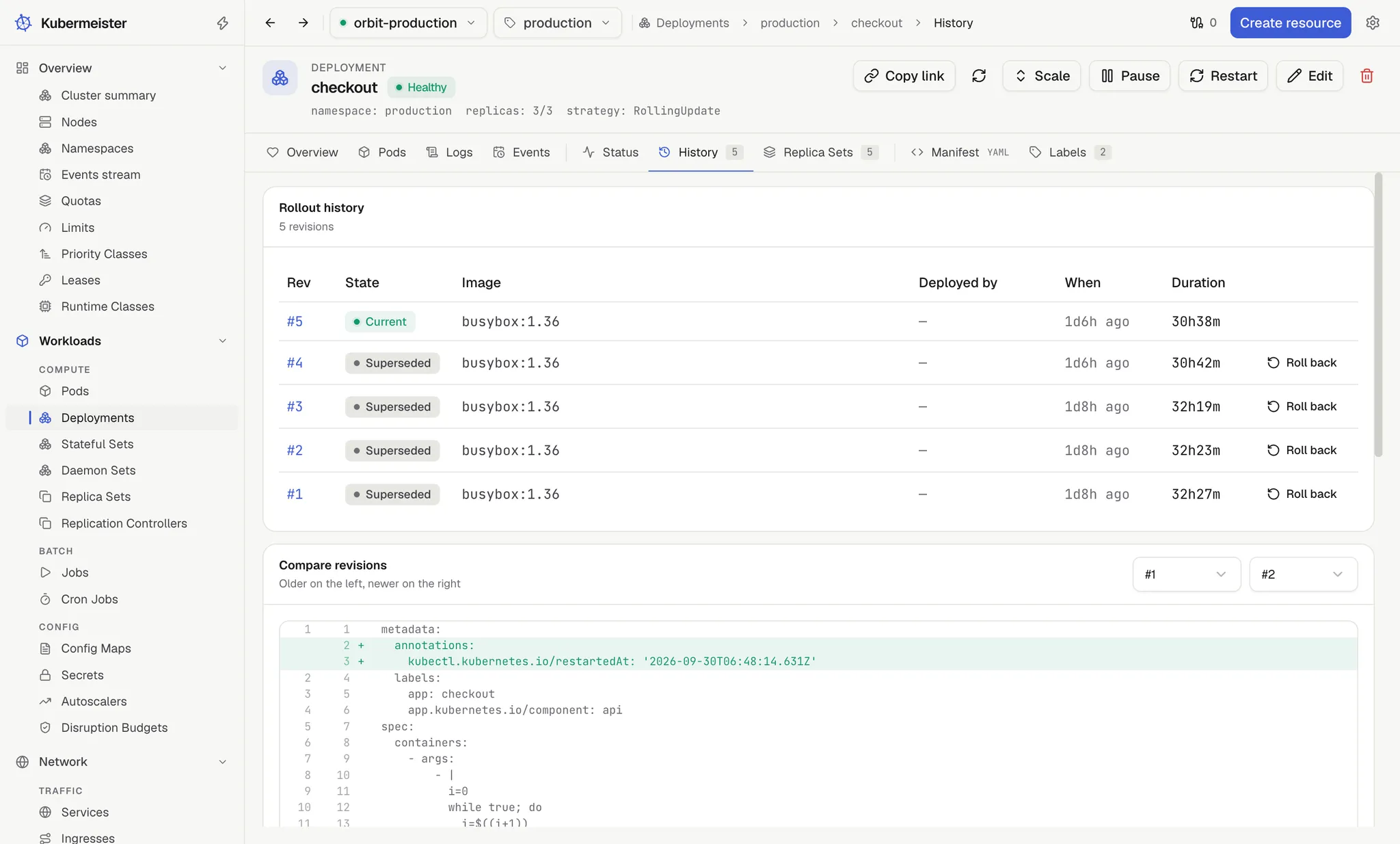
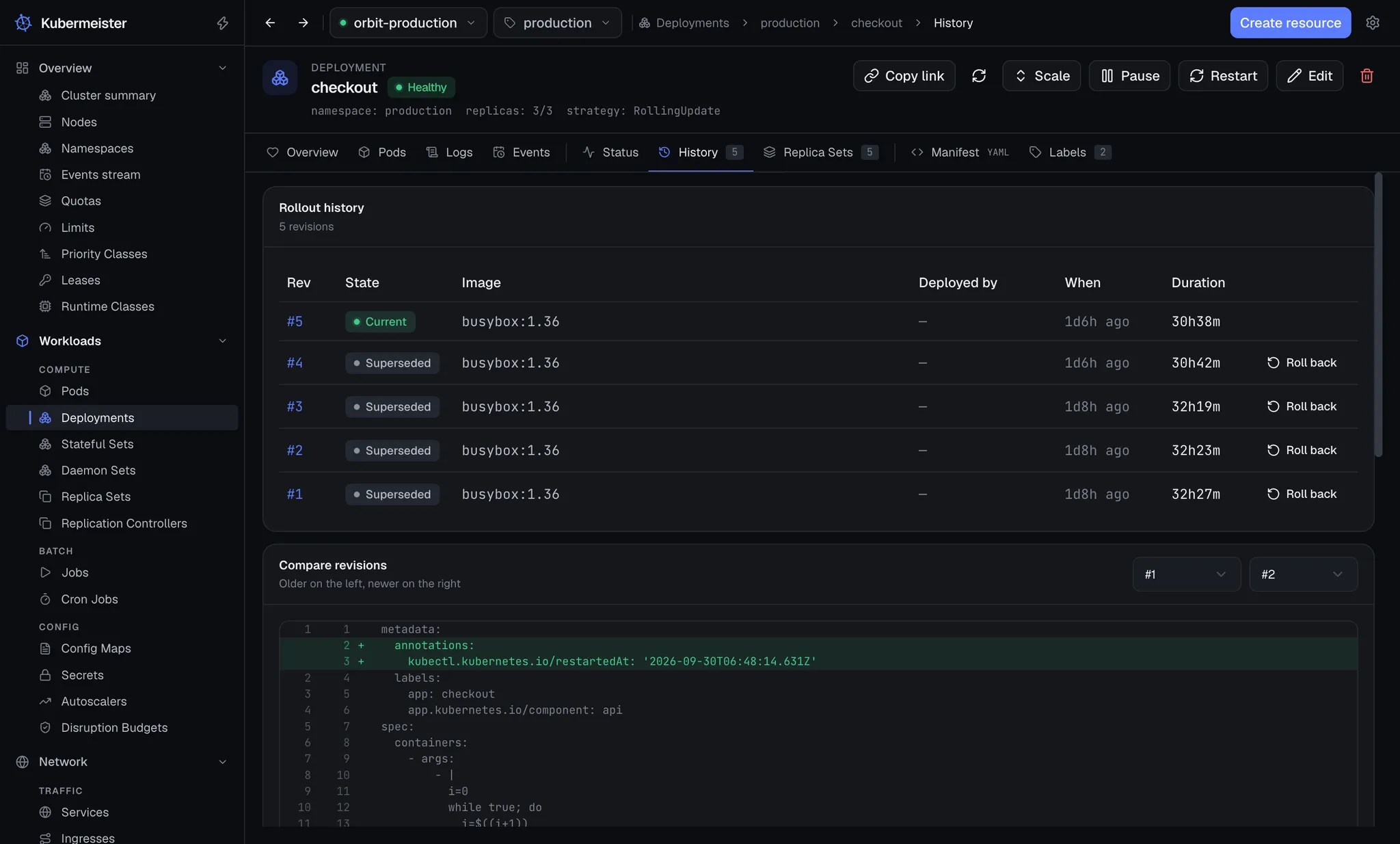
Section titled “History”The History tab lists every revision the Deployment still has a ReplicaSet for, newest first:
Rev, State (Current or Superseded), Image, Deployed by, When and Duration. Deployed by is
the kubernetes.io/change-cause annotation on that revision, not a user name, and reads — when
nobody set one.
Comparing revisions
Section titled “Comparing revisions”Below the history, Compare revisions puts two revisions’ pod templates side by side. The From and To pickers start on the revision before the newest and the newest, older on the left and newer on the right. With only one revision it says so instead.
Both sides go through the same canonicalisation the rollback’s skip check uses — keys ordered, blanks
dropped, the controller’s own pod-template-hash label ignored — because the API server fills the two
copies out differently. Without that, a diff is full of differences nobody made. Two revisions that
say the same thing read “No differences: these revisions describe the same pod template.”
The diff itself is a plain line diff, so it stays readable and predictable.
Rolling back
Section titled “Rolling back”Every row in History except the newest has a Roll back button. It asks “Roll back to revision #N?”, naming the image that comes back, and warns that the cluster records the result as a new revision rather than returning to the old number.
A rollback restores that revision’s pod template with a JSON patch, never a strategic merge. That distinction matters: a strategic merge merges container lists by name, so a container added after the target revision would survive the very rollback meant to undo it. A JSON patch replaces the template outright.
The same patch replaces the Deployment’s annotations. The rollout’s own bookkeeping —
deployment.kubernetes.io/revision and its siblings, and kubectl.kubernetes.io/last-applied-configuration
— keeps the Deployment’s current values; every other annotation is taken from the revision you roll
back to. So a kubernetes.io/change-cause returns with the template it described.
If the revision you picked already matches the live template, nothing is written and the app says “Revision #N is already running” instead of rolling the pods for no change.
Pausing
Section titled “Pausing”Pause sets spec.paused and asks for no confirmation. A paused Deployment keeps the pods it has
and the controller applies no further change until you press Resume, which makes it a safe
state to edit the manifest in mid-rollout. Both go through the same guard as every other write — see
writing to the cluster.
In the Deployments list, the status column reads Paused, Available (scaled to zero), Healthy or Progressing.
ReplicaSets
Section titled “ReplicaSets”The Replica Sets tab lists the Deployment’s own generations with their desired, current and ready counts. ReplicaSets and ReplicationControllers also list as their own kinds, each row naming the controller above it in an Owner column, taken from its owner reference.